
This is mainly a summary of my reading of “HTTP Illustrated”. I have omitted many parts that I think are not important or that I did not understand. I will make corrections and fill in the gaps in the future as my knowledge broadens.
First is the HTTP protocol mind map
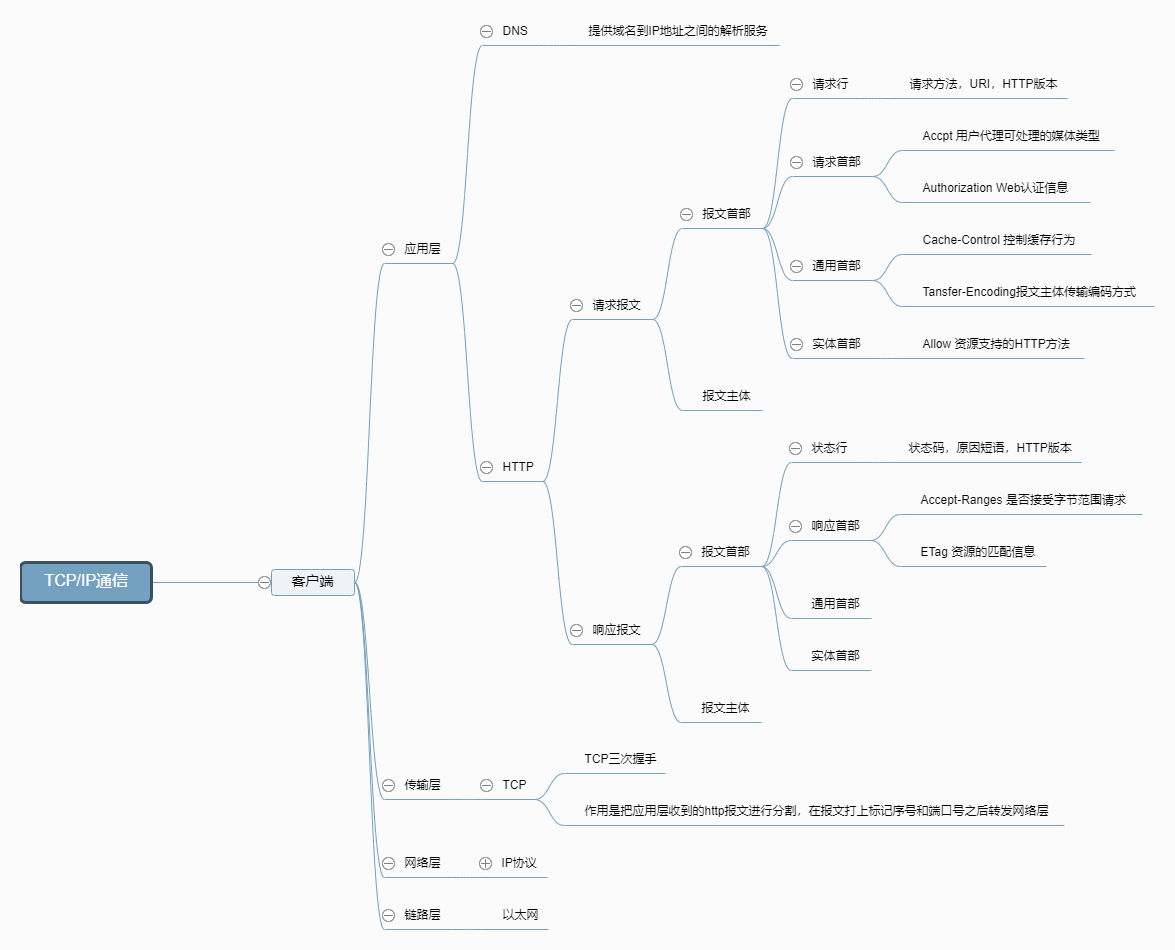
Other
What happens from inputting the URL to displaying the page
This is a very common interview question that helps us review the content of HTTP. It can be easily answered based on the mind map above and other materials.
Find domain name IP
Occurs at the application layer of the TCP/IP protocol and is related to the DNS protocol.
- The browser first searches its own DNS cache.
- It searches the system’s hosts file.
- It searches the router’s DNS cache.
- It searches the service provider’s DNS cache. If the IP address is not found, it sends a query to the domain name server until it finds the IP address.
Initiating an HTTP Request
An HTTP request message consists of a header and a body.
The message header includes:
- Request line
- Request header
- General header
- Entity header
Common request headers
Accept: text/html,image/* #Types accepted by the browser Accept-Charset: ISO-8859-1 #Encoding types accepted by the browser Accept-Encoding: gzip, compress #Compression encoding types accepted by the browser Accept-Language: en-us, zh-cn #Languages and country codes accepted by the browser Host: www.lks.cn:80 #Host and port number of the browser request If-Modified-Since: Tue, 11 Jul 2000 18:23:51 GMT #Time the page has been cached Referer: http://www.lks.cn/index.html #The page the request originated from User-Agent: Mozilla/4.0 compatible; MSIE 5.5; Windows NT 5.0 #Browser-related information Cookie: #The browser temporarily stores information sent by the server Connection: close1.0/Keep-Alive1.1 #HTTP request version characteristics Date: Tue, 11 Jul 2000 18:23:51 GMT #Time to request the website Allow:GET #Request method: GET, POST is also common Keep-Alive:5 #Connection duration: 5 Connection:keep-alive #Whether to enable a persistent connection Cache-Control:max-age=300 #Maximum cache duration: 300 seconds
The following mainly talks about the cache rules
HTTP Cache
HTTP cache is divided into two categories: forced cache and comparative cache, depending on whether it needs to re-initiate a request to the server. If forced cache is effective, no further interaction with the server is required; comparative cache requires interaction with the server regardless of whether it is effective.
Both types of cache rules can exist at the same time. Forced cache takes precedence over comparative cache. When forced cache is executed, comparative cache rules are no longer executed.
####### Force caching
Expires/Cache-control indicates the expiration rule. When the client makes the first request and the server returns the data, the browser caches the data.
The Expire value indicates the expiration time of the cache. It is an HTTP 1.0 feature, so its role is basically ignored. The disadvantage of Expire is that the expiration time returned is the server time, while the comparison time is the client’s local time, which may cause errors.
Cache-Control is used to define cache instructions, which will override Expires, including public, private, no-cache, no-store, max-age, s-maxage, and must-revalidate.
Comparison Cache
Comparison caches require comparison to determine whether the cache can be used.
When the browser first requests data, the server returns the cache identifier along with the data to the client. On subsequent requests, the client sends the cache identifier to the server, which determines whether the cache is valid and returns a 304 error message, returning only the header portion.
Last-Modified: The last modification time of the resource returned by the server in response to the request.
If-Modified-Since: When you request the server again, this field is used to inform the server of the last modification time of the resource returned by the server during the last request.
Upon receiving a request and detecting the If-Modified-Since header, the server compares it with the last-modified time of the requested resource. If the resource’s last-modified time is greater than If-Modified-Since, indicating that the resource has been modified, the server responds with the entire resource content and a 200 status code. If the resource’s last-modified time is less than or equal to If-Modified-Since, indicating that the resource has not been modified, the server responds with an HTTP 304, instructing the browser to continue using the cached data.
The Last-Modified field only indicates the last modification time to the nearest second. If a resource is modified multiple times within a second, it may not accurately indicate the freshness of the file. If a resource is generated periodically, and the Last-Modified field changes even though the content remains unchanged, the file may not be cached. This may be because the server does not accurately obtain the resource modification time, or the time is inconsistent with the proxy server.
Etag/If-None-Match rule (higher priority than Last-Modified/If-Modified-Since)
ETag: A unique identifier for a server resource. Browsers can cache data based on the ETag value to save bandwidth. If a resource has changed, the ETag helps prevent simultaneous updates from overwriting each other. ETag takes precedence over Last-Modified.
If-None-Match: This field is used to notify the server of the unique identifier of the client’s cached data when the client requests the server again.
Upon receiving the request, the server detects the presence of the If-None-Match header and compares it with the unique identifier of the requested resource. If they differ, indicating the resource has been modified, the server will respond with the entire resource content and a 200 status code. If they match, indicating the resource has not been modified, the server will respond with an HTTP 304, instructing the browser to continue using the cached data.
####### Requests that cannot be cached
HTTP headers containing Cache-Control:no-cache, pragma:no-cache, or Cache-Control:max-age=0 tell the browser not to cache the request
Dynamic requests that require input content based on cookies, authentication information, etc. cannot be cached.
HTTPS securely encrypted requests
Requests that do not contain Last-Modified/Etag or Cache-Control/Expires in the HTTP response header cannot be cached
POST request
Transport layer TCP transmission message
The TCP protocol, located at the transport layer, provides a reliable byte stream service for message transmission. To facilitate transmission, it divides large blocks of data into packets called segments and numbers them so that the server can accurately restore the message information when receiving it. The TCP protocol ensures secure and reliable transmission through methods such as the “three-way handshake.”
The three-way handshake process involves the sender first sending a packet with the SYN (synchronize) flag to the receiver, then waiting for a response within a specified delay. Upon receiving the packet, the receiver sends back a packet with the SYN/ACK flag to confirm the packet’s arrival. The receiver then sends another packet with the ACK flag to indicate a successful handshake. During this process, if the sender doesn’t receive a response within the specified delay, it assumes the receiver didn’t receive the request and will continue sending until a response is received.
Network Layer IP Protocol Querying MAC Addresses
The IP protocol is responsible for transmitting the various data packets segmented by TCP to the recipient. To ensure that the data is transmitted to the recipient, the recipient’s MAC address (physical address) is required. There is a one-to-one correspondence between IP addresses and MAC addresses. While a network device’s IP address can change, its MAC address is generally fixed. The ARP protocol resolves IP addresses into corresponding MAC addresses. When the communicating parties are not on the same local area network (LAN), multiple transfers are required to reach the final destination. During these transfers, the next transfer destination is searched for using the MAC address of the next transfer station.
Data reaches the data link layer
After finding the other party’s MAC address, the data is sent to the data link layer for transmission. This concludes the client’s request.
Server Response
After receiving the HTTP request from the client, the service searches for the resource requested by the client and returns a response message.
The server returns the corresponding file and the page is rendered
The process of rendering a page in a modern browser is as follows: jiexiHTML builds the DOM tree -> builds the render tree -> lays out the render tree -> draws the render tree.
The DOM tree is composed of the arrangement of tags in an HTML file. The render tree is formed by adding CSS or HTML styles to the DOM tree. The render tree only contains DOM elements that are required to be displayed on the page. Elements such as the
element or elements with a display attribute value of none are not in the render tree.