
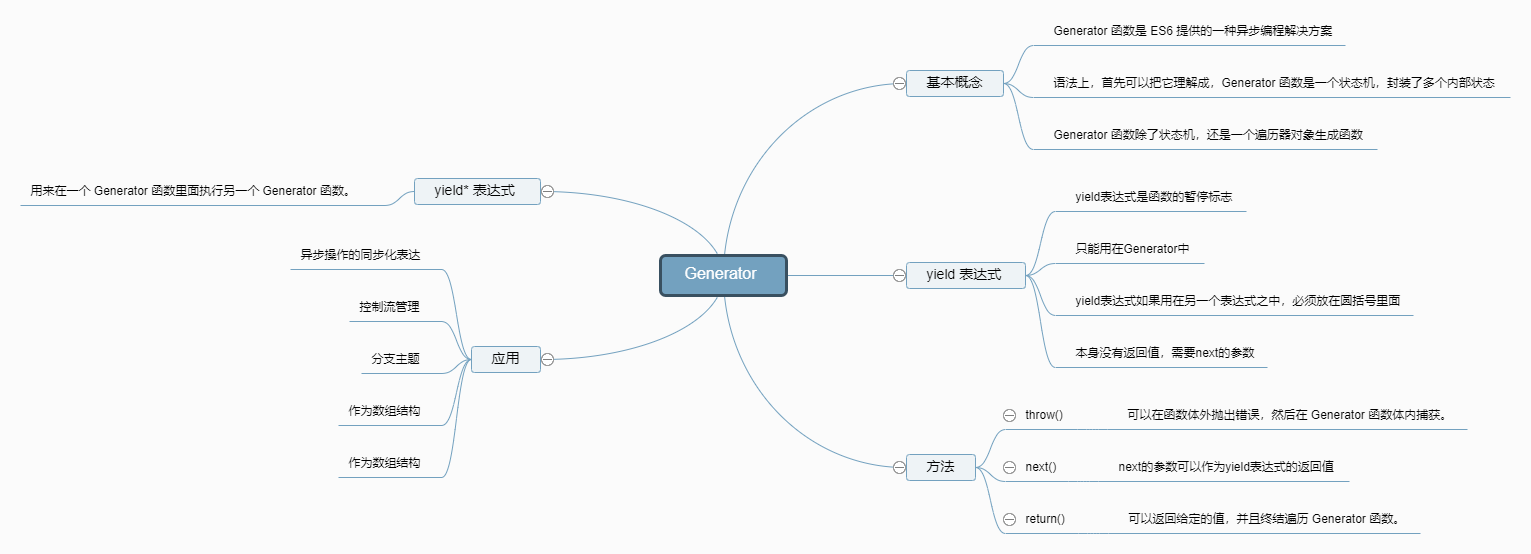
Basic Concepts
Formally, a Generator function is a regular function, but it has two characteristics. First, there’s an asterisk between the function keyword and the function name. Second, the function body uses yield expressions to define different internal states.
function* helloWorldGenerator() { yield ‘hello’; yield ‘world’; return ’ending’; }
var hw = helloWorldGenerator();
After calling the Generator function, the function is not executed, and what is returned is not the result of the function execution, but a traversal object pointing to the internal state.
Calling the Generator function returns an iterator object, which represents the internal pointer to the Generator function. Each subsequent call to the iterator object’s next method returns an object with two properties: value and done. The value property represents the current internal state, which is the value of the expression following the yield expression. The done property is a Boolean value indicating whether the iteration has completed.
yield expression
The yield expression is a pause signal.
When a yield expression is encountered, the execution of subsequent operations is suspended, and the value of the expression immediately following the yield is used as the value attribute value of the returned object.
Until the return statement is reached, the value of the expression after the return statement is used as the value property of the returned object. If the function does not have a return statement, the value property of the returned object is undefined.
The yield expression can only be used inside a Generator function.
In addition, if the yield expression is used in another expression, it must be placed in parentheses.
The yield expression can be used as a function parameter or placed on the right side of an assignment expression without parentheses.
function* demo() {
  console.log('Hello' + yield); // SyntaxError
  console.log('Hello' + yield 123); // SyntaxError

  console.log('Hello' + (yield)); // OK
  console.log('Hello' + (yield 123)); // OK
  foo(yield 'a', yield 'b'); // OK
    let input = yield; // OK
}
Traverser object
You can assign a Generator to the Symbol.iterator property of an object, giving the object the Iterator interface.
var myIterable = {}; myIterable[Symbol.iterator] = function* () { yield 1; yield 2; yield 3; };
[…myIterable] // [1, 2, 3]
After executing the Generator function, it returns an iterator object. This object also has the Symbol.iterator property and returns itself after execution. (ES6 specifies that this iterator is an instance of the Generator function and inherits the methods of the Generator function’s prototype object).
function* gen() { // some code }
var g = gen();
gSymbol.iterator === g // true g instanceof gen === g // true
The for…of loop automatically iterates over the Iterator objects generated by the Generator function.
function* foo() { yield 1; yield 2; yield 3; yield 4; yield 5; return 6; }
for (let v of foo()) { console.log(v); } // 1 2 3 4 5
Similarly, you can iterate over objects that use a Generator as an Iterator interface.
function* objectEntries() {
  let propKeys = Object.keys(this);

  for (let propKey of propKeys) {
    yield [propKey, this[propKey]];
  }
}

let jane = { first: 'Jane', last: 'Doe' };

jane[Symbol.iterator] = objectEntries;

for (let [key, value] of jane) {
  console.log(`${key}: ${value}`);
}
// first: Jane
// last: Doe
method
What next(), throw(), and return() have in common
Their function is to resume the execution of the Generator function and replace the yield expression with a different statement.
//next() replaces the yield expression with a value. const g = function* (x, y) { let result = yield x + y; return result; };
const gen = g(1, 2); gen.next(); // Object {value: 3, done: false}
gen.next(1); // Object {value: 1, done: true} // Equivalent to replacing let result = yield x + y // with let result = 1; //throw() replaces the yield expression with a throw statement. gen.throw(new Error(’error’)); // Uncaught Error: error // Equivalent to replacing let result = yield x + y // with let result = throw(new Error(’error’)); return() replaces the yield expression with a return statement. gen.return(2); // Object {value: 2, done: true} // Equivalent to replacing let result = yield x + y // with let result = return 2;
yield*
Syntactically, if a yield expression is followed by an iterator object, an asterisk () must be added after the yield expression to indicate that it returns an iterator object. This is called a yield expression.
Any data structure that has an Iterator interface can be traversed by yield*.
let read = function* () { yield ‘hello’; yield* ‘hello’; };
for(let i of read()){ console.log(i) } //hello h,e,l,l,o
The yield* statement traverses a complete binary tree.
// Below is the binary tree constructor. // The three parameters are the left tree, the current node, and the right tree. function Tree(left, label, right) { this.left = left; this.label = label; this.right = right; }
// Below is the inorder traversal function. // Since the returned value is a traverser, a generator function is used. // The function uses a recursive algorithm, so the left and right trees must be traversed using yield* function* inorder(t) { if (t) { yield* inorder(t.left); yield t.label; yield* inorder(t.right); } }
// Generate a binary tree below function make(array) { // Check if it is a leaf node if (array.length == 1) return new Tree(null, array[0], null); return new Tree(make(array[0]), array[1], make(array[2])); } let tree = make([[[‘a’], ‘b’, [‘c’]], ’d’, [[’e’], ‘f’, [‘g’]]]);
// Traverse the binary tree var result = []; for (let node of inorder(tree)) { result.push(node); }
result // [‘a’, ‘b’, ‘c’, ’d’, ’e’, ‘f’, ‘g’]
Application
State Machine
var clock = function* () { while (true) { console.log(‘Tick!’); yield; console.log(‘Tock!’); yield; } }; Compared to the ES5 implementation, the above Generator implementation lacks the external variables used to store state, making it simpler and safer.
Synchronous expression of asynchronous operations
function* main() { var result = yield request(“http://some.url”); var resp = JSON.parse(result); console.log(resp.value); }
function request(url) { makeAjaxCall(url, function(response){ it.next(response); }); }
var it = main(); it.next();
Subsequent operations of asynchronous operations can be placed below the yield expression; they will not be executed until the next method is called.
Control Flow Management
Use a function to automatically perform all steps in sequence.
function* longRunningTask(value1) {
  try {
    var value2 = yield step1(value1);
    var value3 = yield step2(value2);
    var value4 = yield step3(value3);
    var value5 = yield step4(value4);
    // Do something with value4
  } catch (e) {
    // Handle any error from step1 through step4
  }
}
scheduler(longRunningTask(initialValue));
function scheduler(task) { var taskObj = task.next(task.value); // If the Generator function hasn’t finished, continue calling it. if (!taskObj.done) { task.value = taskObj.value scheduler(task); } }
The above approach is only suitable for synchronous operations. That is, all tasks must be synchronous and no asynchronous operations are allowed. This is because the code here continues execution as soon as the return value is received, without determining when the asynchronous operation has completed. To control the flow of asynchronous operations, see the thunk section below.
Yield* can decompose a task into multiple tasks that are executed sequentially.
let jobs = [job1, job2, job3];

function* iterateJobs(jobs){
  for (var i=0; i< jobs.length; i++){
    var job = jobs[i];
    yield* iterateSteps(job.steps);
  }
}
for (var step of iterateJobs(jobs)){
  console.log(step.id);
}
The jobs array encapsulates multiple tasks of a project, and iterateJobs adds yield* commands to these tasks in turn.
As an array structure
Generator can be thought of as an array structure because the Generator function can return a series of values, which means it can provide an array-like interface for any expression.
function* doStuff() { yield fs.readFile.bind(null, ‘hello.txt’); yield fs.readFile.bind(null, ‘world.txt’); yield fs.readFile.bind(null, ‘and-such.txt’); } for (task of doStuff()) { // Task is a function that can be used like a callback function } //es5 function doStuff() { return [ fs.readFile.bind(null, ‘hello.txt’), fs.readFile.bind(null, ‘world.txt’), fs.readFile.bind(null, ‘and-such.txt’) ]; }
Encapsulating asynchronous tasks
Generator functions can pause and resume execution, which is the fundamental reason why they can encapsulate asynchronous tasks. In addition, they have two other features that make them a complete solution for asynchronous programming: data exchange within and outside the function body and error handling mechanisms.
Where asynchronous operations need to be paused, they are indicated with a yield statement.
The value property of the next return value is the data output by the Generator function; the next method can also accept parameters to input data into the Generator function body.
Errors thrown outside the Generator function using the throw method of the pointer object can be caught by the try…catch code block inside the function body.
example:
var fetch = require('node-fetch');

function*gen(){
  var url = 'https://api.github.com/users/github';
  var result = yield fetch(url);
  console.log(result.bio);
}
var g = gen();
var result = g.next();

result.value.then(function(data){
  return data.json();
}).then(function(data){
  g.next(data);
});
Asynchronous process management of Generator functions
Let’s take an example and try to manage asynchronous processes using only Generator:
function fetchData(time,fn){
//An asynchronous function that executes a callback after random*1000ms setTimeout(function(){ fn(time) },Math.random()*1000) }
var taskList = function *(){
for(let i=0;i<10;i++){
//Generate tasks 0-10
yield fetchData(i,function(data){
console.log(Callback for task ${data})
})
}
}
var taskObj = taskList() var task = taskObj.next() while(!task.done){ task = taskObj.next() } //Callback for task 6 //Callback for task 4 //Callback for task 0 //Callback for task 2 //Callback for task 1 //Callback for task 7 //Callback for task 8 //Callback for task 9 //Callback for task 5 //Callback for task 3
You can see that the order of tasks executed in each fetchData run is different, and the “execute one task first, then the next” effect cannot be achieved. This is where the Thunk function comes in handy.
Thunk Function
A thunk function replaces a multi-parameter function with a single-parameter function that accepts a callback function as a parameter.
function thunkify(fn) {
    return function() {
      var args = new Array(arguments.length);
      var ctx = this;

      for (var i = 0; i < args.length; ++i) {
        args[i] = arguments[i];
      }

      return function (done) {
        var called;

        args.push(function () {
          if (called) return;
          called = true;
          done.apply(null, arguments);
        });

        try {
          fn.apply(ctx, args);
        } catch (err) {
          done(err);
        }
      }
    }
  };
For example:
var fetchData = function(data,fn){ setTimeout(function(){ console.log(“Reading file “+data+””) fn(data) },1000) } fetchData(1,function(data){ console.log(“File “+data+” Reading Completed”) })//Normal function call var fetchDataThunk = thunkify(fetchData) fetchDataThunk(1)(function(data){ console.log(“File “+data+” Reading Completed”) })//Add chunk call
It can be seen that after calling fetchDataThunk(1), a function with a callback function as a parameter is returned. Combined with yield, the result inside the function can be returned to the result of the next() call. This allows the function to be controlled from outside the function.
Let’s take the fetchData above as an example:
var thunkify = require(’thunkify’); var fetchData = function(data,fn){ setTimeout(function(){ console.log(“Reading file “+data+””) fn(data) },Math.random()*1000) } var fetchDataThunk = thunkify(fetchData) var taskList = function *(){ var f1 = yield fetchDataThunk(1) var f2 = yield fetchDataThunk(2) }
var task = taskList(); var taskObj = task.next(); console.log(taskObj) taskObj.value(function(data){ console.log(“File “+data+” read completed”) var taskObj2 = task.next(); taskObj2.value(function(data){ console.log(“file” + data + “read completed”) }) }) // Reading file 1 // Reading file 1 // Reading file 2 // Reading file 2
Next, let’s go back to the original requirement and use thunk to make the functions in the Generator “execute one after the next”.
//Running in a Node.js environment var thunkify = require(’thunkify’); var fetchData = function(data,fn){ setTimeout(function(){ console.log(“Reading file “+data+””) fn(data) },Math.random()*1000) } var fetchDataThunk = thunkify(fetchData) var taskList = function *(){ for(let i=0;i<5;i++){ yield fetchDataThunk(i) console.log(“File “+i+” read completed”) } }
function run (fn){ var task = fn(); function next(){ //task.next() returns {value:[Function],done:false/true} //The value property is used to call the method to be executed next var result = task.next(); if (result.done) return; result.value(next); } next() }
run(taskList) // Reading file 0 // Completed reading file 0 // Reading file 1 // Completed reading file 1 // Reading file 2 // Completed reading file 2 // Reading file 3 // Completed reading file 3 // Reading file 4 // Completed reading file 4
As you can see, the asynchronous functions in taskList are executed sequentially, which is almost the same as synchronous ones.
Thunk functions aren’t the only solution for automatic execution of generator functions. The key to automatic execution is a mechanism that automatically controls the flow of the generator function, receiving and returning program execution rights. Callback functions can accomplish this, as can Promise objects.
co module
Writing the executor for the Generator function above is a bit cumbersome. The co module can solve this problem.
Have fun using it!
//Run in nodejs environment
var co = require('co');
var fetchData = function(data){
    setTimeout(function(){
        console.log("read file"+data+"中")
    },Math.random()*1000)
}
var taskList = function *(){
    for(let i=0;i<5;i++){
        yield fetchData(i)
        console.log("File"+i+"Reading completed")
    }
}


co(taskList)
// UnhandledPromiseRejectionWarning: Unhandled promise rejection (rejection id: 1): TypeError: You may //only yield a function, promise, generator, array, or object, but the following object was passed: //"undefined"
//(node:16260) [DEP0018] DeprecationWarning: Unhandled promise rejections are deprecated. In the future, //promise rejections that are not handled will terminate the Node.js process with a non-zero exit code.
Reading file 0
An error occurred. I’ll have to look at the source code.
function co(gen) {
  var ctx = this;

  return new Promise(function(resolve, reject) {
    if (typeof gen === 'function') gen = gen.call(ctx);
    if (!gen || typeof gen.next !== 'function') return resolve(gen);

    onFulfilled();
    function onFulfilled(res) {
      var ret;
      try {
        ret = gen.next(res);
      } catch (e) {
        return reject(e);
      }
      next(ret);
    }
  });
}
function next(ret) {
  if (ret.done) return resolve(ret.value);
  var value = toPromise.call(ctx, ret.value);
  if (value && isPromise(value)) return value.then(onFulfilled, onRejected);
  return onRejected(
    newTypeError(
      'You May only yield a function, promise, generator, array, or object, '
- ‘but the following object was passed: “’
- String(ret.value)
- ‘”’ ) ); }
The co module essentially packages two types of executors (thunk functions and promise objects) into a single module. The prerequisite for using co is that the yield command of a generator function must be followed by only a thunk function or a promise object.
Rewrite it into Promise and try it
var co = require(‘co’); var fetchData = function(data){ new Promise((resolve, reject)=>{ setTimeout(function(){ console.log(“Reading file “+data+””) resolve() },Math.random()*1000) }) } var taskList = function *(){ var f1 = fetchData(0) console.log(“File “+0+” read completed”) var f2 = fetchData(1) console.log(“File “+1+” read completed”) }
co(taskList).then(res=>{ console.log(“All completed”) }).catch(e=>{ console.log(“Error”) }) // File 0 read completed // File 1 read completed // All completed // Reading file 1