
I have never been particularly clear about this concept. This time I will summarize it through data and experiments.
Definition
Event Bubbling
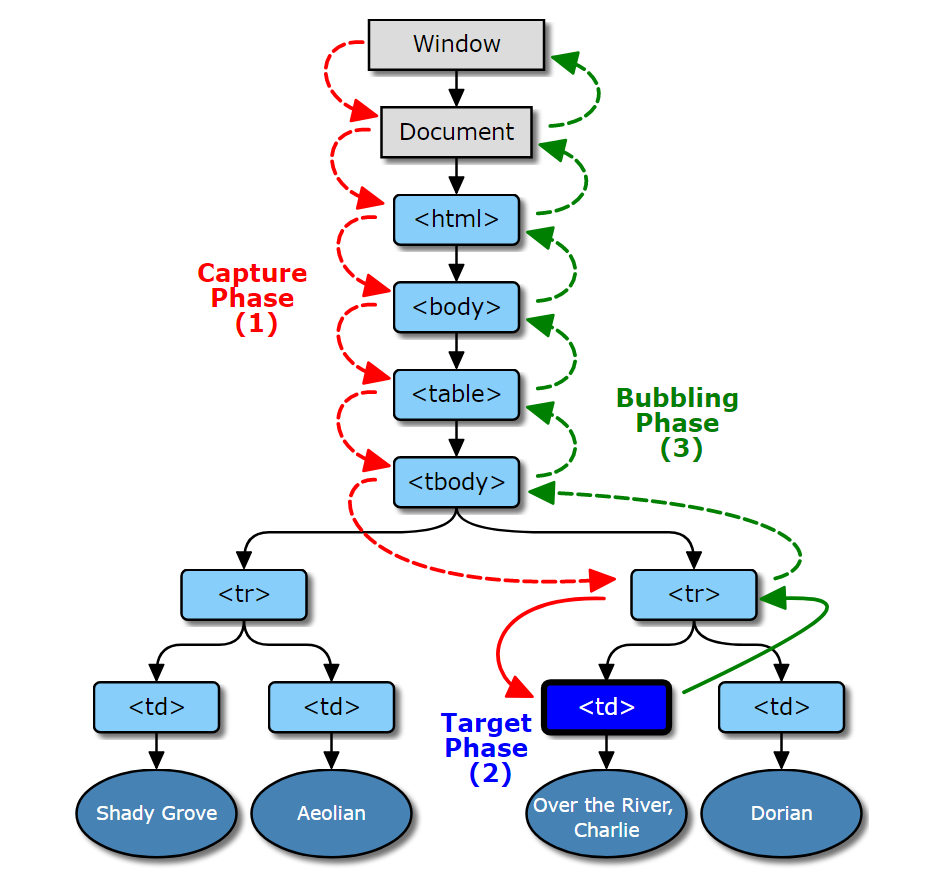
IE’s event flow is called event bubbling. This means that an event begins at the most specific element (the event target) and propagates upward to less specific nodes (the document). All modern browsers support event bubbling and will propagate events all the way to the window object.
Event Capture
The idea behind event capture is that less specific nodes should receive events first, while the most specific nodes should receive them last. Event capture is used to catch events before they reach their intended target. It’s supported by IE9+, Safari, Chrome, Opera, and Firefox, and captures events starting from the window (despite the DOM Level 2 event specification requiring it to start from the document). Because older browsers don’t support it, event capture is rarely used.
DOM Event Flow
DOM Level 2 events define an event flow as consisting of three phases: the event capture phase, the target phase, and the event bubbling phase. Event capture occurs first, providing an opportunity to intercept the event. Then, the target actually receives the event. Finally, the bubbling phase allows you to respond to the event.
Let’s look at the example below
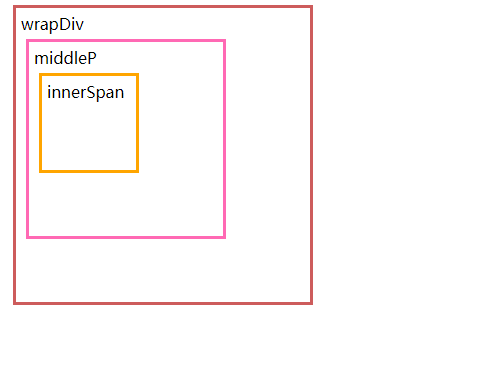
 <div id="wrapDiv">wrapDiv
    <p id="middleP">middleP
        <span id="innerSpan">innerSpan</span>
    </p>
</div>


#wrapDiv, #middleP, #innerSpan{
    margin: 5px;padding: 5px;box-sizing: border-box;cursor: default;
}
#wrapDiv{
    width: 300px;height: 300px;border: indianred 3px solid;
}
#middleP{
    width: 200px;height: 200px;border: hotpink 3px solid;
}
#innerSpan{
    display: block; width: 100px; height: 100px; border: orange 3px solid;
}


var wrapDiv = document.getElementById("wrapDiv");
var middleP = document.getElementById("middleP");
var innerSpan = document.getElementById("innerSpan");
Event Capture Elements (Bubble) Triggering Order
First, let’s look at event capture.
middleP.addEventListener("click", function(e){
    console.log("middleP capture", e.target.nodeName, e.currentTarget.nodeName);
}, true);
wrapDiv.addEventListener("click", function(e){
    console.log("wrapDiv capture", e.target.nodeName, e.currentTarget.nodeName);
}, true);
innerSpan.addEventListener("click", function(e){
    console.log("innerSpan capture", e.target.nodeName, e.currentTarget.nodeName);
}, true);
//wrapDiv captures SPAN DIV middleP captures SPAN P innerSpan captures SPAN SPAN
As you can see, the order of binding does not affect the capture order. Event capture is… Less specific nodes should receive events earlier
The event bubbling is
** That is, the event is initially received by the most specific element (event target), and then propagates upward to less specific nodes**
This point will not be tested any more.
e.target and e.currentTarget
Let’s talk about the two properties of the above code, e.target and e.currentTarget, you can see
target is the trigger event, and currentTarget is the listener event
Which happens first, event capturing or bubbling?
Next, do another experiment to see which happens first, capture or bubbling
// Bubble phase events middleP.addEventListener(“click”, function(e){ console.log(“middleP Bubble”, e.target.nodeName, e.currentTarget.nodeName); }, false); wrapDiv.addEventListener(“click”, function(e){ console.log(“wrapDiv Bubble”, e.target.nodeName, e.currentTarget.nodeName); }, false); innerSpan.addEventListener(“click”, function(e){ console.log(“innerSpan Bubble”, e.target.nodeName, e.currentTarget.nodeName); }, false); // Capture phase binding events middleP.addEventListener(“click”, function(e){ console.log(“middleP Capture”, e.target.nodeName, e.currentTarget.nodeName); }, true); wrapDiv.addEventListener(“click”, function(e){ console.log(“wrapDiv capture”, e.target.nodeName, e.currentTarget.nodeName); }, true); innerSpan.addEventListener(“click”, function(e){ console.log(“innerSpan capture”, e.target.nodeName, e.currentTarget.nodeName); }, true); //wrapDiv capture SPAN DIV // middleP capture SPAN P //innerSpan bubbles SPAN SPAN //innerSpan capture SPAN SPAN // middleP bubbles SPAN P // wrapDiv bubbles SPAN DIV
In theory, capturing events should occur before bubbling.
However, innerSpan’s bubbling occurs first. The explanation for this result is:
In the event flow of the target phase, the order in which event handlers are called is the order in which they were registered.
In other words, when the event reaches element p, target and currentTarget are identical, indicating that capture is no longer necessary. At this point, the pre-determined event handlers are executed sequentially, and bubbling continues after completion.
event.stopPropagation
The function stopPropagation stops further propagation of the current event during both the capture and bubbling phases.
Let’s use the example above again. Note that I added e.stopPropagation() during the bubbling phase of innerspan.
// Bubble phase events middleP.addEventListener(“click”, function(e){ console.log(“middleP Bubble”, e.target.nodeName, e.currentTarget.nodeName); }, false); wrapDiv.addEventListener(“click”, function(e){ console.log(“wrapDiv Bubble”, e.target.nodeName, e.currentTarget.nodeName); }, false); innerSpan.addEventListener(“click”, function(e){ e.stopPropagation() console.log(“innerSpan Bubble”, e.target.nodeName, e.currentTarget.nodeName); }, false); // Capture phase binding events middleP.addEventListener(“click”, function(e){ console.log(“middleP Capture”, e.target.nodeName, e.currentTarget.nodeName); }, true); wrapDiv.addEventListener(“click”, function(e){ console.log(“wrapDiv capture”, e.target.nodeName, e.currentTarget.nodeName); }, true); innerSpan.addEventListener(“click”, function(e){ console.log(“innerSpan capture”, e.target.nodeName, e.currentTarget.nodeName); }, true); //wrapDiv capture SPAN DIV //middleP capture SPAN P //innerSpan bubble SPAN SPAN //innerSpan capture SPAN SPAN
It can be seen that e.stopPropagation prevents the subsequent bubbling events of middleP and wrapDiv from being triggered.
You might say, no, after innerSpan’s bubbling, innerSpan’s capture still happened and was not blocked? This depends on stopImmediatePropagation.
The difference between event.stopPropagation stopImmediatePropagation
The function of stopPropagation is to stop further propagation of the current event in the capture and bubbling phases.
stopImmediatePropagation Stops the event from bubbling and prevents other listeners for the same event from being called.
Let’s try this:
innerSpan.addEventListener(“click”, function(e){ e.stopImmediatePropagation() console.log(“innerSpan bubbles”, e.target.nodeName, e.currentTarget.nodeName); }, false); innerSpan.addEventListener(“click”, function(e){ console.log(“innerSpan captures”, e.target.nodeName, e.currentTarget.nodeName); }, true); //innerSpan bubbles SPAN SPAN
This also prevents the capture event from being triggered.
Conceptually, after calling stopPropagation, access to subsequent nodes is immediately stopped, but all event handlers bound to the current node are executed. However, after calling stopImmediatePropagation, event handlers bound to the current element after the current event handler are no longer executed, except for all subsequent nodes.
Does onclick occur in the capture phase or the bubbling phase?
No more experiments, just state the conclusion directly, bubble up.
Event Delegation
In JavaScript, the number of event handlers added to a page directly affects the overall performance of the page. This is due to a number of factors. First, each function is an object and takes up memory; the more objects in memory, the worse the performance. Second, the number of DOM visits required to specify all event handlers in advance delays the interactive readiness of the entire page.
The solution to the “too many event handlers” problem is event delegation. Event delegation takes advantage of event bubbling. By specifying only one event handler, you can manage all events of a certain type. For example, the click event will bubble up to the document level. In other words, we can specify an onclick event handler for the entire page without having to add an event handler to each clickable element.
for example
(function(){ var lists = document.getElementById(’lists’); lists.addEventListener(‘click’,showColor,false); function showColor(e){ var x = e.target; if(x.nodeName.toLowerCase() === ’li’){ alert(‘The color is ’ + x.innerHTML); } } })(); Instead of looping through the entire li list
Bubbling or Capturing?
For event delegation, there’s no clear advantage or disadvantage between handling events in the capturing or bubbling phases. However, since the bubbling event flow model is compatible with all major browsers, it’s recommended to use the bubbling model for compatibility reasons.